Handshake: Skills Rooted in Coursework
This project is a feature concept for Handshake* that lets students elaborate on the courses they have taken, listing the skills and tools they have used and the projects they have completed and the peer/faculty endorsements for that course. After listing a course, the skills and tools used for that course (in form of tags) can be sent to their instructor who can then validate it making them stand out to recruiters.
Recruiters can then browse and filter applicants for a position based on the tags (skills, tools, proficiency) on their profiles. This additive feature is designed to facilitate the demonstration of college students' expertise and skillset.
Role: UX Research, Interaction Design, Information Architecture
Team: 3
Duration: 3 weeks
Tools: Figma, Paper prototyping
Methods: Interviews (6), Competitive analysis, Paper → Lo-fi → Hi-fi, Usability testing (7 participants, 3 rounds)
THE PROBLEM
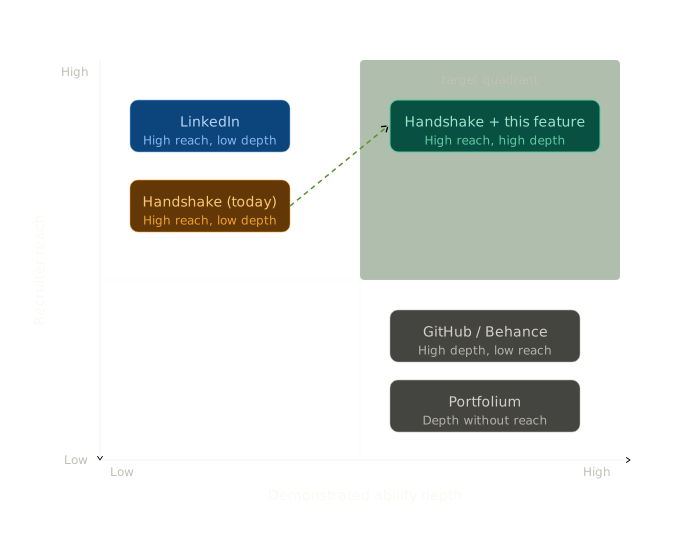
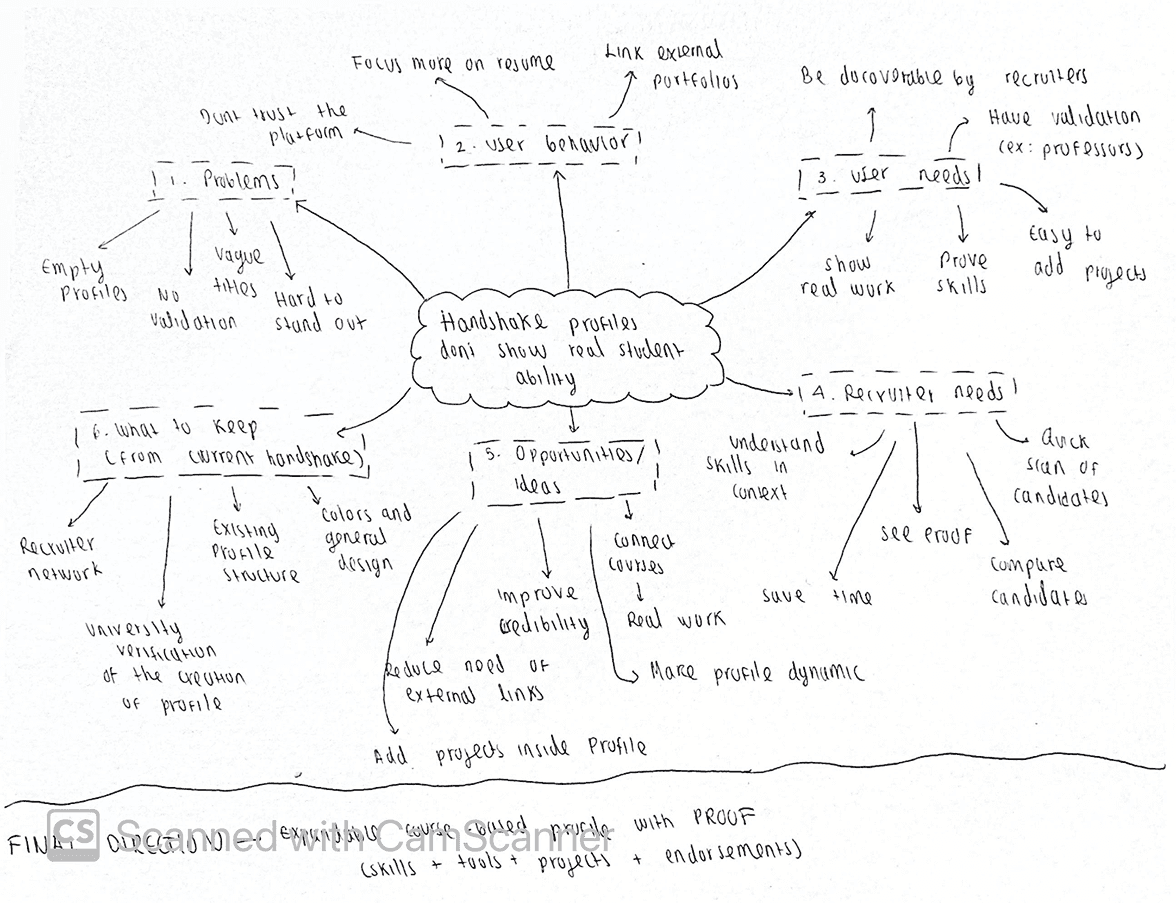
A large number of college students, especially freshmen and sophomores, have a hard time finding an internship due to the lack of exposure to the industry. A lot of times, all they have to show for themselves are the courses they have taken; and unfortunately, in the current job-platforms like LinkedIn and Handshake, though they can list their courses and maybe write a line or two about them, it is most of the time overlooked by the recruiters. Consequently, they miss out on standing out on what they spend the most of their time in and learn the most from: their coursework. Their skills don't get demonstrated to the recruiters properly. There exists, however, a Skills section in Handshake, although the skills there are self-reported by the student and no way to verify for the recruiters. This results in frustration for the student and ambiguity for the recruiter as they can't possibly fathom the skillset of a student.
DISCOVERY
User research, which consisted of 6 interviews with students from different disciplines across 3 unversitites and 1 recruiter, was synthesized in the following 4 key findings:
Students use Handshake reactively. Students hardly maintain their Handshake profiles and only pull up Handshake ahead of application cycles.
Profiles capture only identity. Though Handshake profiles are verified by the university and it does a good job of communicating the identity of the student (School, Major, GPA), it falls short when it comes to demonstrating their capabilities that potentially help them land an internship or a job.
Only course titles, a lot of the times, say almost nothing. We have learnt some funky* course titles which said absolutely nothing about what the course was about. An interviewee expressed her frustration on the fact that she learnt hard skills in that course but a recruiter, only watching her profile, may never know that.
Self-reported skills were presumably less credible. The recruiter mentioned that he rarely pays attention to the Skills section in Handshake because that does not seem to be a proper reflection of an applicant.
We closed each session with a concept prompt: what if courses expanded to show skills, tools, projects, and endorsements? Positive across all six. Consistent preference: demonstrated ability should live where the job search happens.
DESIGN DIRECTION
We decided to come up with* one feature to encompass both stuggles that we found during the user reseach: (i) Course titles failing to capture the depth of the course, and (ii) Skills being self-reported with minimal way of verification.
The decision was to introduce an additive feature to the most student-friendly platform, Handshake, that blends in with the Handshake UI and gives students the opportunity to enhance their courses and link their skills into it, which, later, they can have endorsed by the course instructor.
PROCESS & ITERATION
Ideation Processes:
Brainstorming: We considered a range of ideas from PDF attachments to courses to AI-generated skill suggestion. Most of them solved the problem partially; what survived is making the the course row the container. Courses already exist on the profile, students already populate them, recruiters already encounter them. This does not break the UI, rather it builds on the existing system.
Sketching: Version A: course title with full disclosure on expand and all details visible at once. This version risks balance, too little information when collapsed, too much when expanded. Which got us to Version B: progressive disclosure via badge counts on the collapsed row ("6 skills · 4 tools · 2 projects · 4 endorsements"). Gives recruiters a signal before they click.
DESIGN DIRECTION
We decided to come up with* one feature to encompass both stuggles that we found during the user reseach: (i) Course titles failing to capture the depth of the course, and (ii) Skills being self-reported with minimal way of verification.
The decision was to introduce an additive feature to the most student-friendly platform, Handshake, that blends in with the Handshake UI and gives students the opportunity to enhance their courses and link their skills into it, which, later, they can have endorsed by the course instructor.
PROCESS & ITERATION
Ideation Processes:
Brainstorming: We considered a range of ideas from PDF attachments to courses to AI-generated skill suggestion. Most of them solved the problem partially; what survived is making the the course row the container. Courses already exist on the profile, students already populate them, recruiters already encounter them. This does not break the UI, rather it builds on the existing system.
Sketching: Version A: course title with full disclosure on expand and all details visible at once. This version risks balance, too little information when collapsed, too much when expanded. Which got us to Version B: progressive disclosure via badge counts on the collapsed row ("6 skills · 4 tools · 2 projects · 4 endorsements"). Gives recruiters a signal before they click.
Iterations
Visual 4: Iterations collage
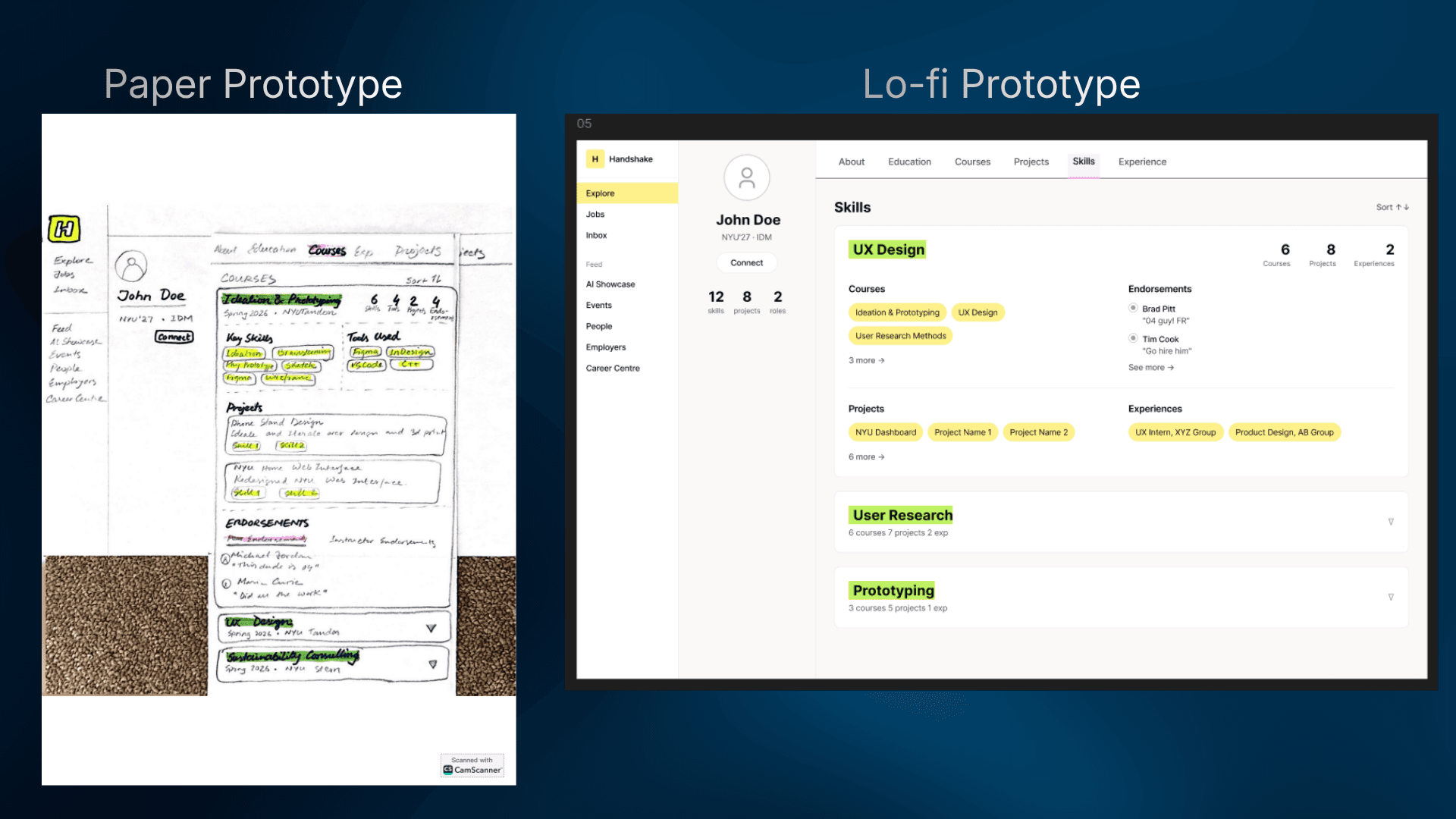
Paper Prototype: Two core screens (Courses and Skills) along with the dashboard was presented to 3 participants. The idea landed better than we were expecting. Some design concerns came up, for example the lack of colors can risk making the hierarchy seem unnatural, that was a challenge considering we had been planning to adhere to the UI of Handshake as it exists today. Another thing that was brought up was the wasted space (marked in red in the paper prototype, fig 4.1) under names. We had to decide what would be the best thing to put there.
Low-fidelity Prototype: The feedbacks from the paper prototype were implemented to finally touch figma (a week after the project kicked off). Put some colors strategically in the design, and populated the profile bar (maked in red in low-fi prototype, fig 4.2) with the total number of skills, projects, and experiences. Basically a bird's eye view to the recruiters. We also finalized the skeleton for the cards in the two main sections: Courses and Skills. Cards start with the most important things: what skills and tools the student used for the course. Then it lists the projects done for that class; followed by the Peer and Faculty Endorsements. One thing flagged to us during the testing of this prototype was that we are treating Peer and Faculty endorsements in the similar way while they serve different purposes. The most important feeback we got was that the we had way too many number of tabs, 6 in total, which can lead to students being overwhelmed to fill in, and recruiters skimming through -- precisely what we wanted to avoid in the first place.
Final Prototype: We had a lot of feedbacks and insights by the time we started the final high-fidelity prototype. Aside from the minor adjustments pointed out during the testing, the most challenging thing we did, however, was synthesizing the contents (what matters the most) into the 3 tabs that we had in the final prototype: Overview, Work, and Skills. Work encompasses projects done for courses (we realized that exam-based classes which don't have projects were not worth leaving a card for) and projects done for past internships/experiences. In the Skills tab, recruiters can see the list of skills that the student has. Each skill, upon expansion, shows if it is validated by an instructor, how many projects it came up for, and the document proofs for that skill. It was quite different from the paper and low-fi prototype, but as per the testing, in a good way.
Iterations
Visual 4: Iterations collage
Paper Prototype: Two core screens (Courses and Skills) along with the dashboard was presented to 3 participants. The idea landed better than we were expecting. Some design concerns came up, for example the lack of colors can risk making the hierarchy seem unnatural, that was a challenge considering we had been planning to adhere to the UI of Handshake as it exists today. Another thing that was brought up was the wasted space (marked in red in the paper prototype, fig 4.1) under names. We had to decide what would be the best thing to put there.
Low-fidelity Prototype: The feedbacks from the paper prototype were implemented to finally touch figma (a week after the project kicked off). Put some colors strategically in the design, and populated the profile bar (maked in red in low-fi prototype, fig 4.2) with the total number of skills, projects, and experiences. Basically a bird's eye view to the recruiters. We also finalized the skeleton for the cards in the two main sections: Courses and Skills. Cards start with the most important things: what skills and tools the student used for the course. Then it lists the projects done for that class; followed by the Peer and Faculty Endorsements. One thing flagged to us during the testing of this prototype was that we are treating Peer and Faculty endorsements in the similar way while they serve different purposes. The most important feeback we got was that the we had way too many number of tabs, 6 in total, which can lead to students being overwhelmed to fill in, and recruiters skimming through -- precisely what we wanted to avoid in the first place.
Final Prototype: We had a lot of feedbacks and insights by the time we started the final high-fidelity prototype. Aside from the minor adjustments pointed out during the testing, the most challenging thing we did, however, was synthesizing the contents (what matters the most) into the 3 tabs that we had in the final prototype: Overview, Work, and Skills. Work encompasses projects done for courses (we realized that exam-based classes which don't have projects were not worth leaving a card for) and projects done for past internships/experiences. In the Skills tab, recruiters can see the list of skills that the student has. Each skill, upon expansion, shows if it is validated by an instructor, how many projects it came up for, and the document proofs for that skill. It was quite different from the paper and low-fi prototype, but as per the testing, in a good way.
KEY DECISIONS & TRADE-OFFS
Addition, not redesign. One expandable layer added to one section. Everything else untouched. The constraint killed feature creep.
Badge counts as pre-interaction signals. Collapsed rows show summary counts. A recruiter can distinguish a rich course from an empty one without clicking.
Accordion over separate page. In-place expansion keeps surrounding context visible. Recruiters scan, open, close = no navigation disruption.
Dual endorsement registers. Peer endorsements = social confirmation, can attest that the student works well in team. Instructor validation = credentialed confirmation. Different roles, different visual weight. The "Validated" badge encodes that at a glance.
TESTING
7 participants across 3 rounds. No prior context. Task: "You're a recruiter. Look at this profile and tell me what this student is strong at."
Comprehension was immediate inside expanded courses. Badge counts read before clicking, as intended. Instructor validation trusted without prompting. Cross-referencing understood without explanation. One participant: "So it shows where the skill actually came from."
Sharpest feedback:
[Quote] "This feels like LinkedIn but specifically for students who doesn't have 10 internship experiences." -- Siraz, 22 [Econ @ NYU]
KEY DECISIONS & TRADE-OFFS
Addition, not redesign. One expandable layer added to one section. Everything else untouched. The constraint killed feature creep.
Badge counts as pre-interaction signals. Collapsed rows show summary counts. A recruiter can distinguish a rich course from an empty one without clicking.
Accordion over separate page. In-place expansion keeps surrounding context visible. Recruiters scan, open, close = no navigation disruption.
Dual endorsement registers. Peer endorsements = social confirmation, can attest that the student works well in team. Instructor validation = credentialed confirmation. Different roles, different visual weight. The "Validated" badge encodes that at a glance.
TESTING
7 participants across 3 rounds. No prior context. Task: "You're a recruiter. Look at this profile and tell me what this student is strong at."
Comprehension was immediate inside expanded courses. Badge counts read before clicking, as intended. Instructor validation trusted without prompting. Cross-referencing understood without explanation. One participant: "So it shows where the skill actually came from."
Sharpest feedback:
[Quote] "This feels like LinkedIn but specifically for students who doesn't have 10 internship experiences." -- Siraz, 22 [Econ @ NYU]
REFLECTION
The instinct was to jump to a solution. Research showed the problem was more layered than one expandable row could fix.
Sketching and paper-prototyping before Figma resolved the core IA question, 'how much to show before interaction vs. after' faster than any digital tool could. The brainstorming sessions produced the course row insight because we were working within an existing constraint.
The principle that it should feel like it was always there, was the hardest discipline and the most productive.[Quote] "This feels like LinkedIn but specifically for students who doesn't have 10 internship experiences." -- Siraz, 22 [Econ @ NYU]